
Smart Robot
A ROS 2 robot built on a single-board computer and a three-axis omnidirectional wheel platform, with LiDAR and a camera for real-time mapping, map navigation, and computer vision.
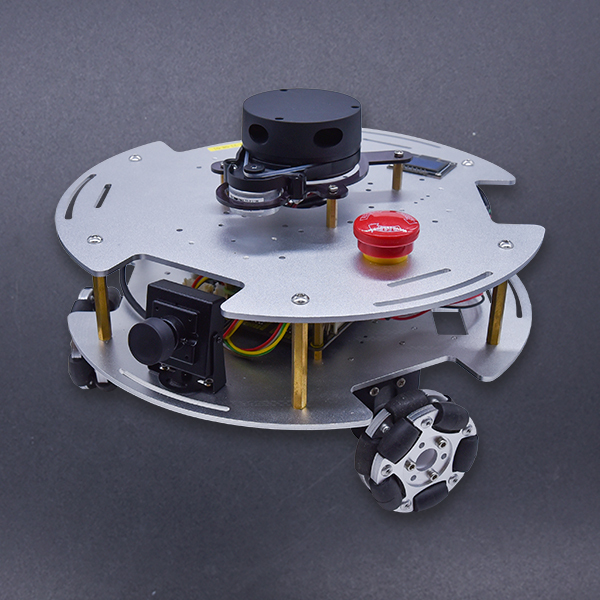
Product overview
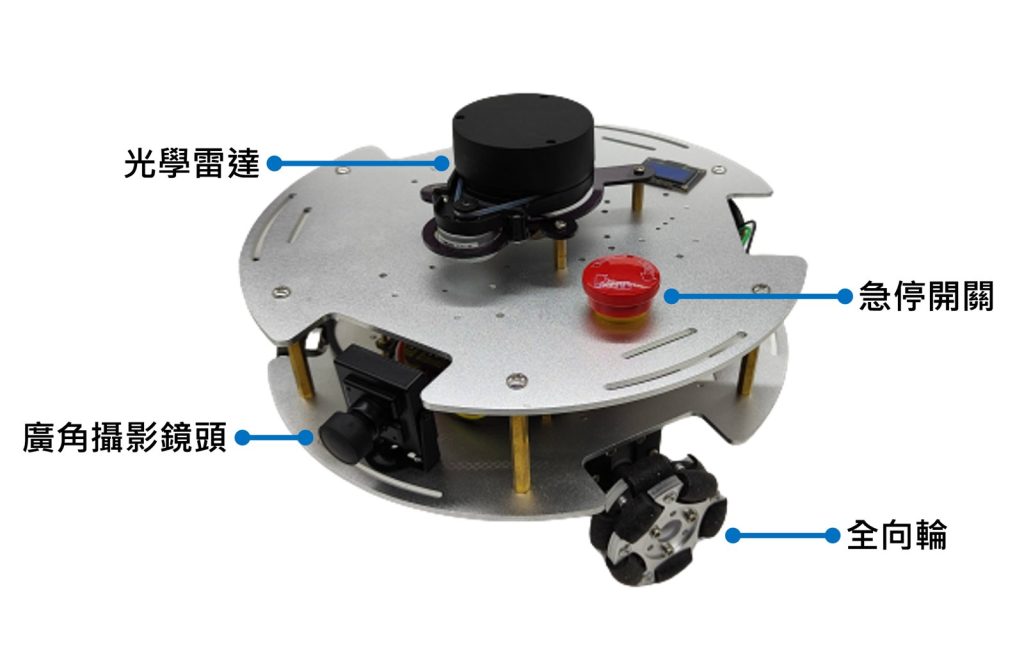
The Smart Robot is built on a single-board computer combined with a mobile platform. The system runs on ROS 2 and, in addition to basic motion control, includes a LiDAR sensor and a camera.
The three-axis omnidirectional wheel drive lets the robot move more freely and steadily in environments with many obstacles. You can swap in a different single-board computer, from the entry-level Raspberry Pi 4 to the Jetson series for AI projects and x86 boards with Intel processors. On the software side, it offers LiDAR real-time mapping and map navigation, along with computer vision examples and instructions matched to the single-board computer you choose.
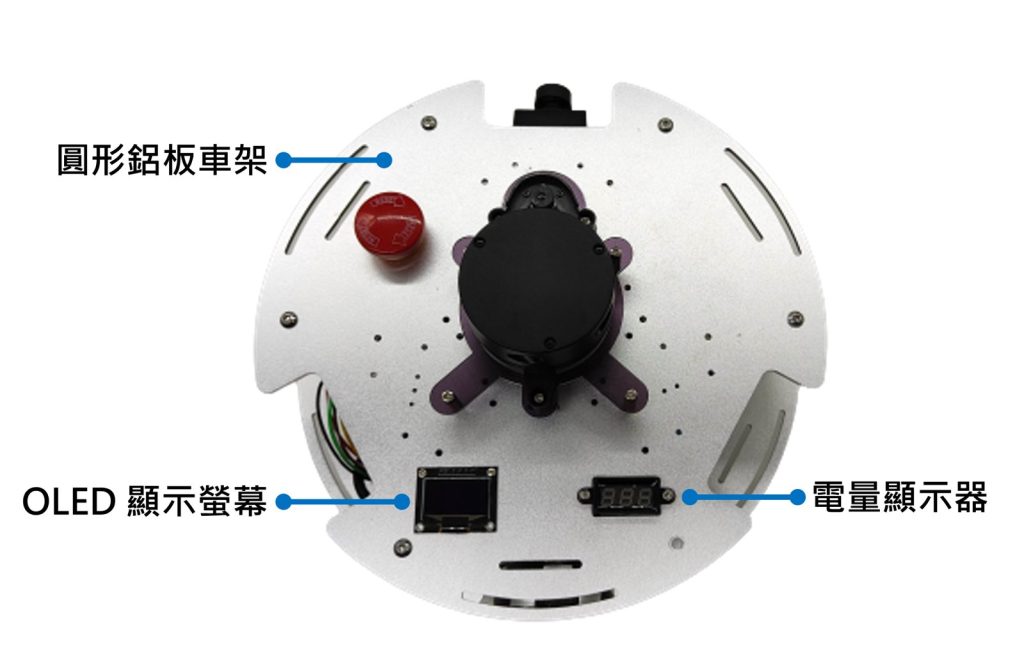
Hardware overview
What this kit teaches
Getting started
Hardware overview, powering on and connecting, and the ROS 2 concepts Node, Topic, Service, Parameter, and Action.
LiDAR
Navigation 2, static map building and SLAM algorithms, map post-processing, robot navigation and parameter tuning, and multi-point navigation.
Computer vision
Face, color, QR code, AprilTag, and lane recognition, plus AI image classification, visual obstacle avoidance, and self-driving cars.
Course outline
Getting started (9 units)
- 1-1 Hardware overview
- 1-2 Powering on and connecting
- 1-3 Quick operation
- 1-4 What is ROS 2?
- 1-5 ROS 2 Node
- 1-6 ROS 2 Topic
- 1-7 ROS 2 Service
- 1-8 ROS 2 Parameter
- 1-9 ROS 2 Action
LiDAR (8 units)
- 2-1 What is LiDAR?
- 2-2 Navigation 2
- 2-3 How to build a static map
- 2-4 Other SLAM algorithms
- 2-5 Map post-processing
- 2-6 Robot navigation
- 2-7 Tuning navigation parameters
- 2-8 Multi-point navigation
Computer vision (12 units)
- 3-1 Reading images
- 3-2 Face recognition
- 3-3 Face-tracking robot
- 3-4 Color recognition
- 3-5 QR code recognition
- 3-6 AprilTag recognition
- 3-7 Lane recognition
- 3-8 Image processing—self-driving car
- 3-9 AI image classification
- 3-10 AI visual obstacle avoidance
- 3-11 AI image regression
- 3-12 AI visual recognition—self-driving car
Supplementary (2 units)
- 4-1 Installing ROS 2 on a computer
- 4-2 Communication between the computer and the Smart Robot
31 units in total, compiled from the full outline on the iCShop store product page. The number of class periods depends on your school’s schedule; please contact us to plan it.
Specifications
| Single-board computer | Raspberry Pi 4 Model B 4 GB |
| Operating system | Ubuntu MATE 22.04 |
| ROS | ROS 2 Humble |
| Motor control board | OminiBot HV |
| LiDAR | CLDR-08SB |
| Camera | 1080p, 150-degree wide angle, 60 FPS |
| Motors | Hall encoder, 12 V, 366 rpm |
| Structure | Aluminum plates with mounting hardware |
| Wheels | Omni wheels (60 mm) |
| SD card | Micro SD 64 GB |
| Battery | Li-ion battery, 11.1 V, 2200 mAh, 3S (XT60) |
| Dimensions | Approx. 25.4 cm diameter × 16.9 cm height |
What’s in the box
| Item | Quantity |
|---|---|
| Smart Robot | 1 |
| I-Max B6 balance charger (power adapter included) | 1 |
| Li-ion battery, 11.1 V, 2200 mAh, 3S (XT60 connector) | 2 |
This product is a module for R&D and experimentation. Before use, it must be programmed, flashed, wired, or otherwise further assembled by someone with a technical background (such as engineers, graduate students, or teachers and students).
Contact us
Your message goes straight to our team, and we usually reply within one business day.
- 01Questions? Send us a message or add us on LINE.
- 02Quotes and orders, including international shipping
- 03Teacher training and professional development

Scan with your phone to add us on LINE.
Add us on LINE