
APOLLO 11 Discontinued
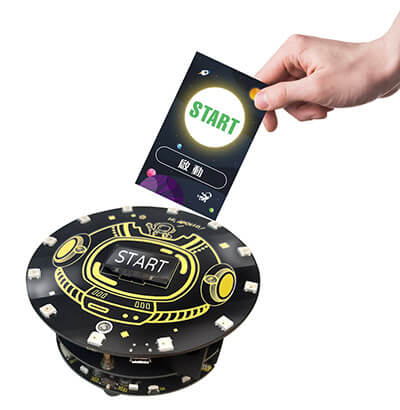
A teaching kit designed for elementary school students learning to program. No computer is needed. Students tap RFID command cards, and APOLLO 11 carries out the actions in the order the commands were entered, making unplugged programming possible.
Hardware specifications
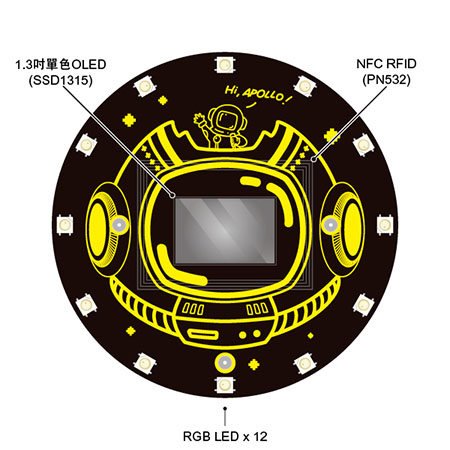
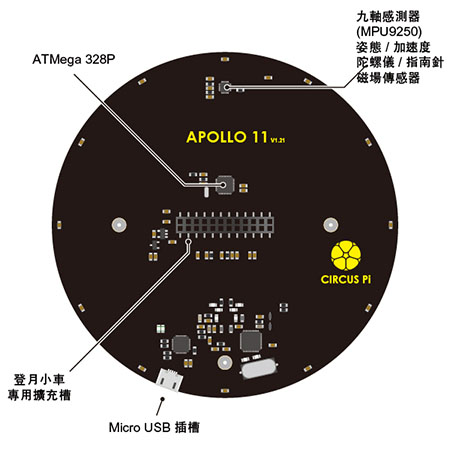
| Microcontroller | ATmega328P-MU |
| 9-axis sensor | MPU9250 (3-axis gyroscope + 3-axis accelerometer + 3-axis magnetometer) |
| NFC RFID | PN532 |
| Display | 1.3-inch monochrome OLED (SSD1315) |
| LED | RGB LED (WS2812B) ×12 |
| ▼ RFID command card, front | ▼ RFID command card, back |
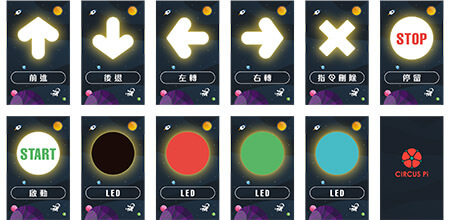
The command cards, shown below, work like a program editor: students tap the commands they want APOLLO 11 to run, in the order they would be written in a program. There are 11 RFID command cards, and each card has its command pre-written to it: start, delete, forward, backward, turn left, turn right, pause, red LED, green LED, blue LED, and LED off. Simply tapping a card sends its command to APOLLO 11, up to 30 action commands can be entered at a time. The number of times an action runs equals the number of times its card is tapped.
1. Start and delete cards
| ▼ Start | ▼ Delete command |
| Tap the card to make APOLLO 11 start carrying out every command that was entered | Undo: tap the card once to delete the last command entered Delete all: restart APOLLO 11 with the power button to delete every command entered |
2. Direction command cards
| ▼ Forward | ▼ Backward |
| Tap the card to enter the “forward” command | Tap the card to enter the “backward” command |
| ▼ Turn left | ▼ Turn right |
| Tap the card to enter the “turn left” command | Tap the card to enter the “turn right” command |
| ▼ Pause | |
| Tap the card to enter the “pause” command |
3. LED command cards
| ▼ Red LED | ▼ Green LED |
| Tap the card to enter the red LED command | Tap the card to enter the green LED command |
| ▼ Turn left | ▼ Turn right |
| Tap the card to enter the blue LED command | Tap the card to enter the LED off command |
Product features
Learn programming without plugging in
Taiwan’s 108 curriculum guidelines actively promote “core competencies,” meaning the knowledge, abilities, and attitudes people need to adapt to life today and face future challenges. As a result, computational thinking, once taught only at the university level, has been moved down to earlier grades and built into required Information Technology courses in elementary school, middle school, and high school (including CTE), so that students build technology and information literacy from an early age. This change leaves teachers and parents wondering how elementary school students can learn these seemingly difficult subjects happily and without pressure.
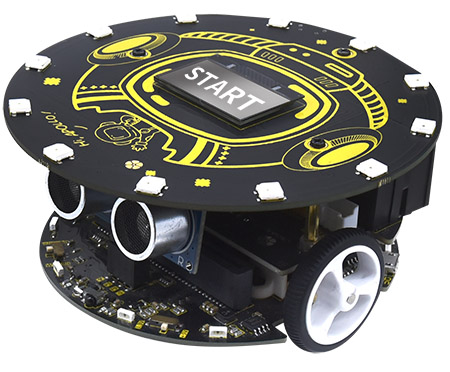
APOLLO 11 is a teaching kit developed specifically for elementary school students learning to program. Without using a computer, students simply tap RFID command cards to send the code on each card to the APOLLO 11 microcontroller (ATmega328P-MU). APOLLO 11 then carries out the actions in the order the commands were entered, making unplugged programming lessons possible.
Paired with the “Hi ! APOLLO” board game, APOLLO 11 lets lessons extend in five ways:
1. Practice design thinking and computational thinking:
Through play, students think about how to break a problem down and arrange the order of the command cards, until APOLLO 11 reaches its goal.
2. Teamwork: Students experience communicating with peers, brainstorming ideas, and sharing the work of collaboration.
3. Engaging teaching tools: APOLLO 11 and the “Hi ! APOLLO” board game are fun and easy to pick up, making Information Technology classes livelier. They can motivate students to learn and help build their information literacy.
4. Theme-based teaching: The kit and lessons are designed around an outer space theme, so students pick up space-related knowledge while learning to program and develop cross-disciplinary skills.
5. Scenario-based teaching: Everyday situations become lesson tasks, so students apply what they learn to real life.
With the extended lessons, students can build a solid foundation starting in elementary school, so the move to Information Technology courses in middle school and high school goes smoothly.
● Cute, creative characters
● Adventure map
Video introduction
Sample activity: Hi ! APOLLO mission worksheet
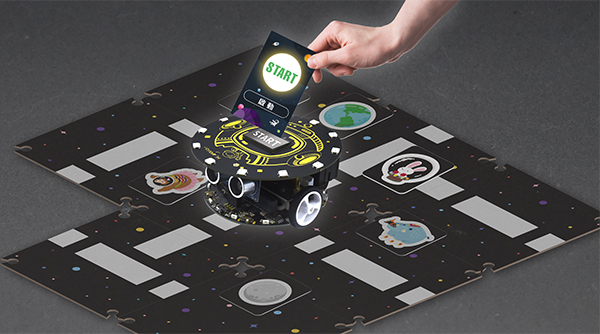
Using the adventure map from the “Hi ! APOLLO” board game, students plan APOLLO 11’s route with command cards:
- Q: Where on the map is Earth, where we and APOLLO 11 are? A: Earth is at A1
- Q: Where on the map is the Moon, where LED Rabbit is? A: The Moon is at F5
- Q: What different symbols are between us and LED Rabbit? A: A star at D3, no-entry signs at A3 and B1, and moving missions at C5 and F3
- Q: LED Rabbit invites us to play on the Moon. How do we take APOLLO 11 to the Moon to visit LED Rabbit? A: Card order: forward ×1, turn left ×1, forward ×5, turn right ×1, pause ×1, start ×1
- Moving mission: Before visiting LED Rabbit, send blue, green, and red LED light signals here. After that, go forward three squares to land on the Moon.
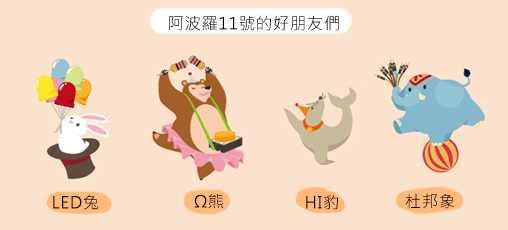
APOLLO 11’s friends: Ω Bear, Hi Leopard, Dupont Elephant, and LED Rabbit.
Shipping list
| Item | Quantity |
|---|---|
| APOLLO 11 | 1 |
| Micro USB cable, 1 m | 1 |
| RFID command cards | 11 |
| Single-compartment storage box | 1 |
A version that includes the lunar car is also available (SKU 368030200639), which can be combined with the MoonCar for extended lessons.
Contact us
Your message goes straight to our team, and we usually reply within one business day.
- 01Questions? Send us a message or add us on LINE.
- 02Quotes and orders, including international shipping
- 03Teacher training and professional development

Scan with your phone to add us on LINE.
Add us on LINE