
Huang Xinhui’s Crazy Classroom Arduino Kit
A learning tool designed for Arduino beginners and enthusiasts. It includes a rich set of components and tutorial videos to help learners build electronics design and programming skills. Suitable for students, makers, and DIY electronics projects.
Product overview
The Crazy Classroom Arduino Kit is a learning tool for beginners, students, and electronics makers, designed by Huang Xinhui, a teacher. A rich set of components plus YouTube tutorial videos lets learners learn Arduino through hands-on practice, from simple circuits to smart control.
- Comprehensive learning content: includes LEDs, resistors, sensors, motors, and other electronic components, starting from the basics and advancing step by step.
- Detailed teaching resources: YouTube tutorial videos provide step-by-step lessons and experiment examples, suitable for self-study or classroom teaching.
- Hands-on and creative: encourages building and creative thinking to meet makers’ needs.
- Easy to use: designed for beginners, so learners with no background can get started quickly.
What this kit teaches
Arduino basics
Get to know Arduino and the breadboard, blink an LED, read code, and control multiple LEDs.
Input and signals
Adjust LED brightness with PWM signals, read buttons and potentiometers, and detect conductivity.
Sensing and actuation
Control a servo motor and read photoresistors and thermistors. The kit also includes an OLED, an ultrasonic module, a stepper motor, and a gear motor for extended projects.
Course outline
01 Getting to know Arduino and the breadboard (1 class period)
Unit content
- Getting to know Arduino
- Breadboard
- Connecting an LED
Materials: Arduino board, breadboard, breadboard jumper wires, LED, 100-ohm resistor
Matching video: “The Easiest Arduino Tutorial Ever” #1. Getting to Know Arduino and the Breadboard (8:43)
02 Blinking an LED (1 class period)
Unit content
- LED blinking
- Circuit diagram
- Getting code from ChatGPT
- Uploading the code
Materials: Arduino board, breadboard, breadboard jumper wires, LED, 100-ohm resistor
Matching video: “The Easiest Arduino Tutorial Ever” #2. Blinking an LED (5:05)
03 Reading the code and using multiple LEDs (1 class period)
Unit content
- Comments
- setup and loop
- Digital output
- delay
- Variables
- Modifying the code
- Multiple LEDs
Materials: Arduino board, breadboard, breadboard jumper wires, LED, 100-ohm resistor
Matching video: “The Easiest Arduino Tutorial Ever” #3. Reading the Code and Using Multiple LEDs (7:09)
04 Adjusting LED brightness with PWM (1 class period)
Unit content
- Digital and analog signals
- PWM analog signals
- Controlling LED brightness
Materials: Arduino board, breadboard, breadboard jumper wires, LED, 100-ohm resistor
Matching video: “The Easiest Arduino Tutorial Ever” #4. Adjusting LED Brightness with PWM (4:50)
05 Buttons and conductivity detection (1 class period)
Unit content
- Introduction to buttons and two wiring methods
- INPUT and INPUT_PULLUP
- Button practice
- Extended application: conductivity detection
- DIY button
Materials: Arduino board, button, breadboard, breadboard jumper wires, LED, 100-ohm and 10K-ohm resistors
Matching video: “The Easiest Arduino Tutorial Ever” #5. Buttons and Conductivity Detection (6:19)
06 Potentiometer (1 class period)
Unit content
- Potentiometer
- Wiring the circuit
- Code
- Serial port
- Troubleshooting
- Other applications
Materials: Arduino board, potentiometer, breadboard, breadboard jumper wires, LED, 100-ohm resistor
Matching video: “The Easiest Arduino Tutorial Ever” #6. Potentiometer (3:55)
07 Servo motor (1 class period)
Unit content
- Servo motor and wiring
- How servo motors work
- Avoiding motor damage
- Code
- Other applications
Materials: Arduino board, servo motor, breadboard, breadboard jumper wires
Matching video: “The Easiest Arduino Tutorial Ever” #7. Servo Motor (4:29)
08 Photoresistor and thermistor (1 class period)
Unit content
- Photoresistor and wiring
- Code
- Observing and changing values
- Serial Plotter
- Thermistor
- Sensing all kinds of things
Materials: Arduino board, photoresistor, thermistor, breadboard, breadboard jumper wires, LED, 100-ohm and 10K-ohm resistors
Matching video: “The Easiest Arduino Tutorial Ever” #8. Photoresistor and Thermistor (7:09)
The course outline is compiled from the YouTube series “The Easiest Arduino Tutorial Ever.” Class periods are estimated from video length; the actual schedule can be adjusted for your class.
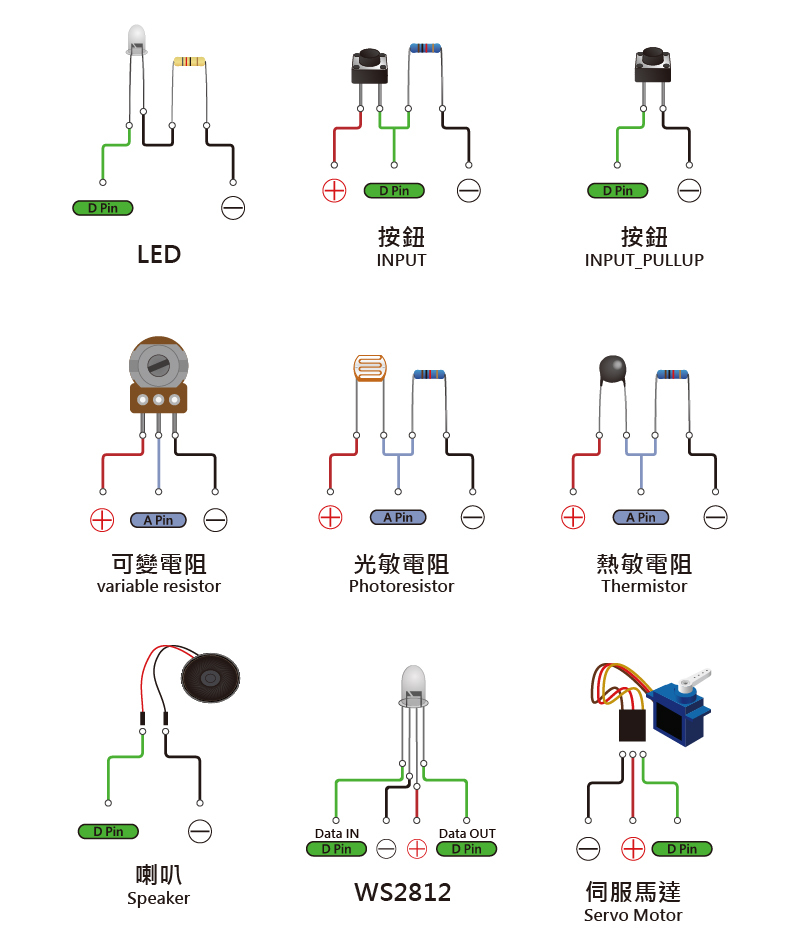
Reference circuit diagrams
Kit contents
| Item | Quantity |
|---|---|
| Arduino Leonardo R3 compatible board | 1 |
| micro USB cable | 1 |
| Breadboard | 1 |
| Breadboard jumper wire set | 1 set |
| Color Dupont wires (male-to-female, 10 wires, 30 cm) | 2 packs |
| Male Dupont alligator clips | 8 |
| Photoresistor (5 mm) | 5 |
| Thermistor | 2 |
| Speaker with male Dupont wires | 1 |
| 5 mm LED (green, white, yellow, blue, and red; clear, high brightness) | 10 each |
| 0.96-inch OLED display, 128×64 | 1 |
| Ultrasonic distance sensor module | 1 |
| RGB LED | 3 |
| Button (through-hole/5 mm tall/2-pin) | 4 |
| Potentiometer (10K ohm) | 3 |
| Precision resistors | 1 set |
| Resistors | 2 sets |
| Servo motor, 180 degrees | 1 |
| USB power cable with female Dupont connector | 1 |
| L298N motor driver module | 1 |
| Gear motor (1:120) | 1 set |
| Stepper motor and stepper motor driver | 1 each |
| Carrying case | 1 |
| Small plastic box (K702) | 1 |
| Laser-cut Arduino base plate | 1 |
| Self-tapping screws | 4 |
| Mini screwdriver (Phillips, 3 mm) | 1 |
About Huang Xinhui
- Founder of “Huang Xinhui’s Crazy Classroom,” who has mentored over a thousand Arduino projects
- Former department head at “Kang Chiao Information” and instructor at technology centers around Taiwan
- Author of “Ardublock Graphical Programming Made Easy”
- Awards and exhibitions: Kuo-Ting Li Technology Art Award, London Design Festival, Germany’s iF Design Award, Japan’s Good Design Award, first place at Intel IoT Roadshow Taipei, first place in the “I Am a Maker—Tech Fashion Competition,” and an interactive landscape installation at the Taipei Lantern Festival
Tutorial videos
8 videos, 48 minutes total
Free to watch—preview the entire course before you buy.
Contact us
Your message goes straight to our team, and we usually reply within one business day.
- 01Questions? Send us a message or add us on LINE.
- 02Quotes and orders, including international shipping
- 03Teacher training and professional development

Scan with your phone to add us on LINE.
Add us on LINE