
IoT Smart House
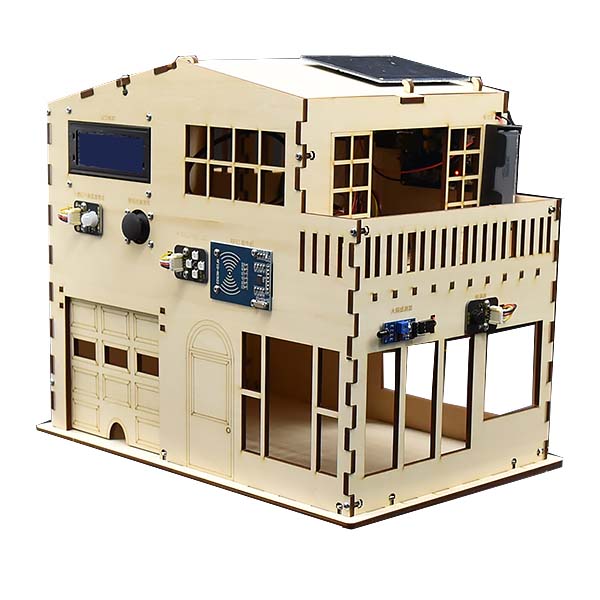
The IoT Smart House simulates a smart home in which everything is connected. From a phone or web page you can view light levels, indoor temperature, humidity, and door access status, and you can also control devices in the house such as the lights and the alarm.
What this kit teaches
From setup and equipment overview to signal input and output
LinkIt 7697 and microcontroller (MCU) concepts; 2004 LCD, DHT11 temperature and humidity sensor, photoresistor, human infrared sensor, dual-axis joystick, RFID, RGB LED, flame sensor, passive buzzer, and solar panel; downloading and installing BlocklyDuino F2, the program list, the programming area and syntax switching; connecting the development board and installing the CP2102 driver; and controlling an LED and uploading programs.
From sensing and display to the home safety alarm
Example 1: Hello Blockly; Example 2: Read DHT11 temperature and humidity values; Example 3: Read photoresistor module values; Example 4: Display text on the LCD; Quiz: Show light, temperature, and humidity on the LCD in turn; Example 5: Read joystick values.
Smart house Bluetooth IoT
Example 11: IoT_House smart house Bluetooth IoT experience, and interacting with the IoT Smart House using LinkIt Remote.
Course outline
01 Software and hardware setup and equipment overview
Unit content
- LinkIt 7697 and microcontroller (MCU) concepts
- 2004 LCD, DHT11 temperature and humidity sensor, photoresistor, human infrared sensor, dual-axis joystick, RFID, RGB LED, flame sensor, passive buzzer, and solar panel
Matching materials: IoT Smart House teacher training slides (December 2024, Xinxing Middle School)
02 BlocklyDuino development environment
Unit content
- Downloading and installing BlocklyDuino F2
- Program list, programming area, and syntax switching
- Connecting the development board and installing the CP2102 driver
Matching materials: IoT Smart House teacher training slides (December 2024, Xinxing Middle School)
03 Signal input and output
Unit content
- Controlling an LED and uploading programs
- Reading button state and using the serial monitor
- Controlling an LED with a button
Matching materials: IoT Smart House teacher training slides (December 2024, Xinxing Middle School)
04 Sensing and display
Unit content
- Example 1: Hello Blockly
- Example 2: Read DHT11 temperature and humidity values
- Example 3: Read photoresistor module values
- Example 4: Display text on the LCD
- Quiz: Show light, temperature, and humidity on the LCD in turn
Matching materials: IoT Smart House teacher training slides (December 2024, Xinxing Middle School)
05 Interactive input and lighting
Unit content
- Example 5: Read joystick values
- Example 6: Read human infrared sensor values
- Example 7: Read the RFID sensor
- Example 8: Control RGB LED colors
- Quiz: Show a different light color for each RFID card read
Matching materials: IoT Smart House teacher training slides (December 2024, Xinxing Middle School)
06 Home safety alarm
Unit content
- Example 9: Read the flame sensor module
- Example 10: Control the buzzer to make sounds
- Quiz: Sound an alarm when a fire is detected
Matching materials: IoT Smart House teacher training slides (December 2024, Xinxing Middle School)
07 Smart house Bluetooth IoT
Unit content
- Example 11: IoT_House smart house Bluetooth IoT experience
- Interacting with the IoT Smart House using LinkIt Remote
Matching materials: IoT Smart House teacher training slides (December 2024, Xinxing Middle School)
The course outline follows the sections of the 2024 IoT Smart House teacher training slides. Example programs come in BlocklyDuino and Arduino versions. Please contact us for the number of class periods, which depends on each school’s schedule.
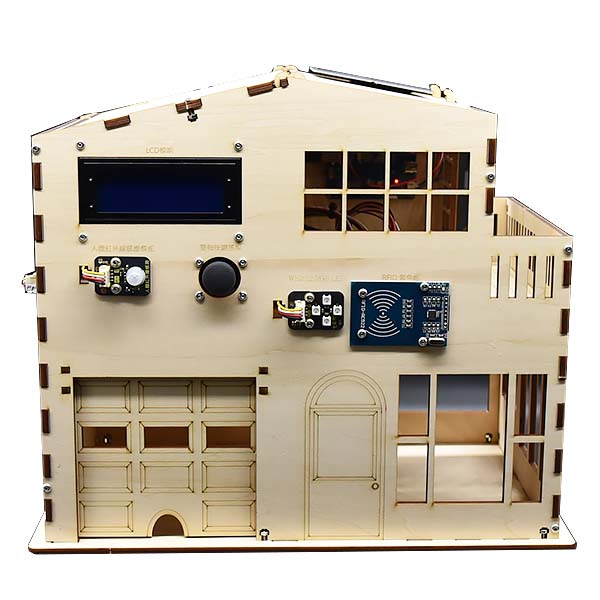
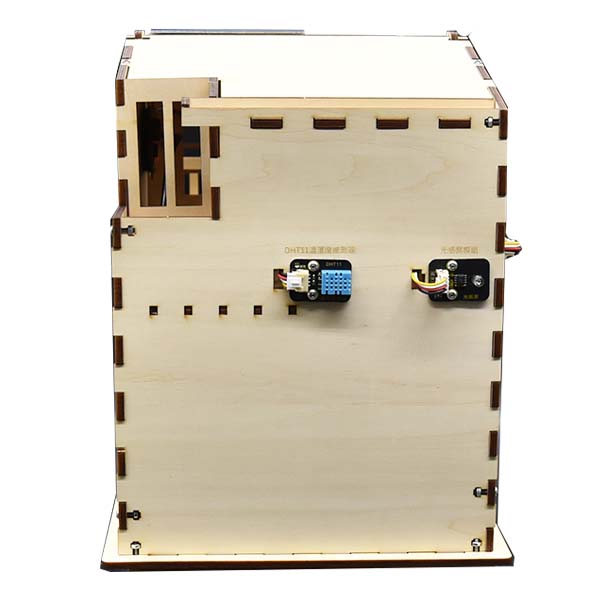
EzDIO version
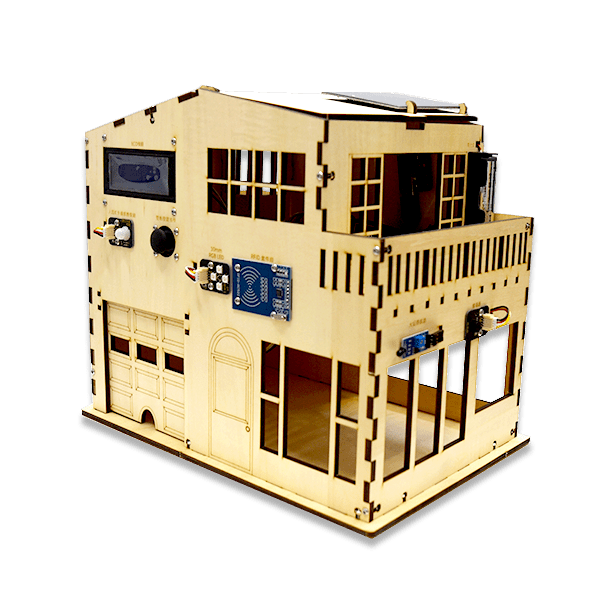
RK IoT version
Hardware specifications
| Main board | Circus 7697D dual-band 2.4 GHz/5 GHz |
| Components and modules | • EzDIO expansion board • Circus DHT11 temperature and humidity sensor module (B), single board • Circus light sensor module, single board • Circus human infrared detection module, single board • JoyStick, dual-axis with button • Circus Pixel full-color LED ×4 module (chip), single board • Mifare RC522 RFID kit (includes card and key fob) • Flame sensor module • Circus passive buzzer module, single board • LG 18650 lithium battery, 2600 mAh • Single-cell 18650 battery holder (with leads) • Lipo Rider Pro solar regulated charging board • Solar panel, 1 W, 80 x 100 mm • IIC/I2C 2004 LCD module (white text on blue) |
| Dimensions (cm) | 34.4 x 23.4 x 29.5 (L x W x H) |
Product features
The IoT Smart House simulates a smart home in which everything is connected. From a phone or web page you can view data such as light levels, indoor temperature, humidity, and door access status, and you can also control devices in the house such as the light switches and the alarm (buzzer). It has four built-in operating modes by default: Auto (A), Manual (M), Network (Q), and Setup (S).
Hardware overview
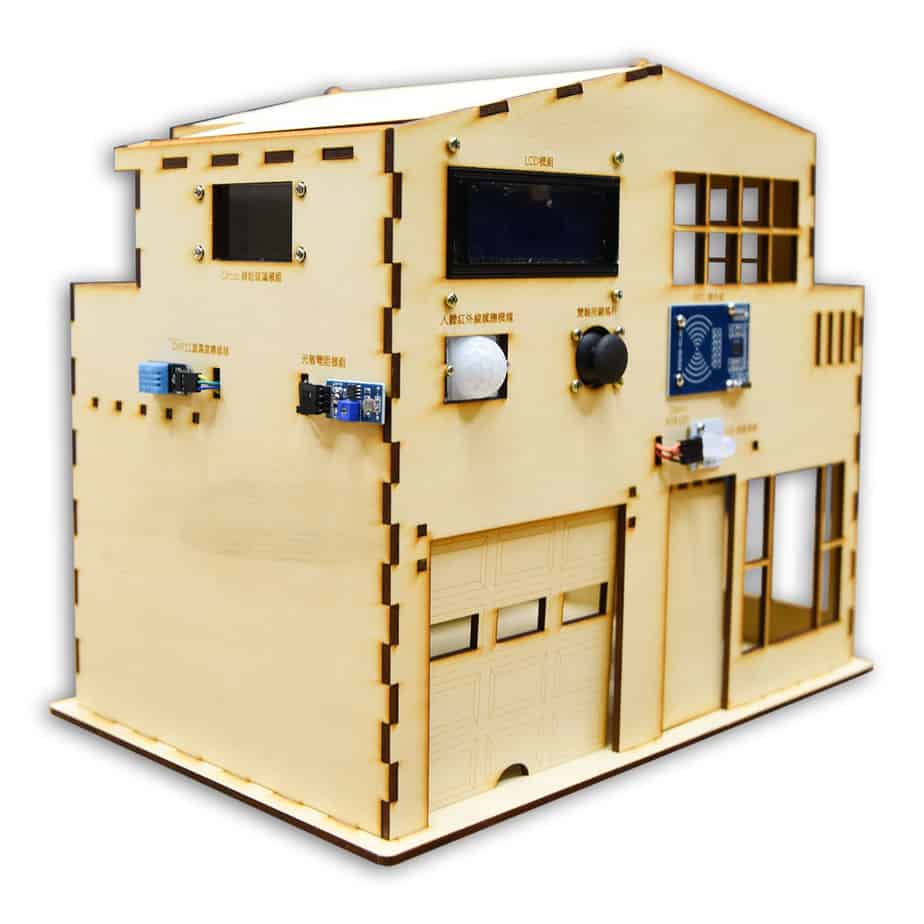
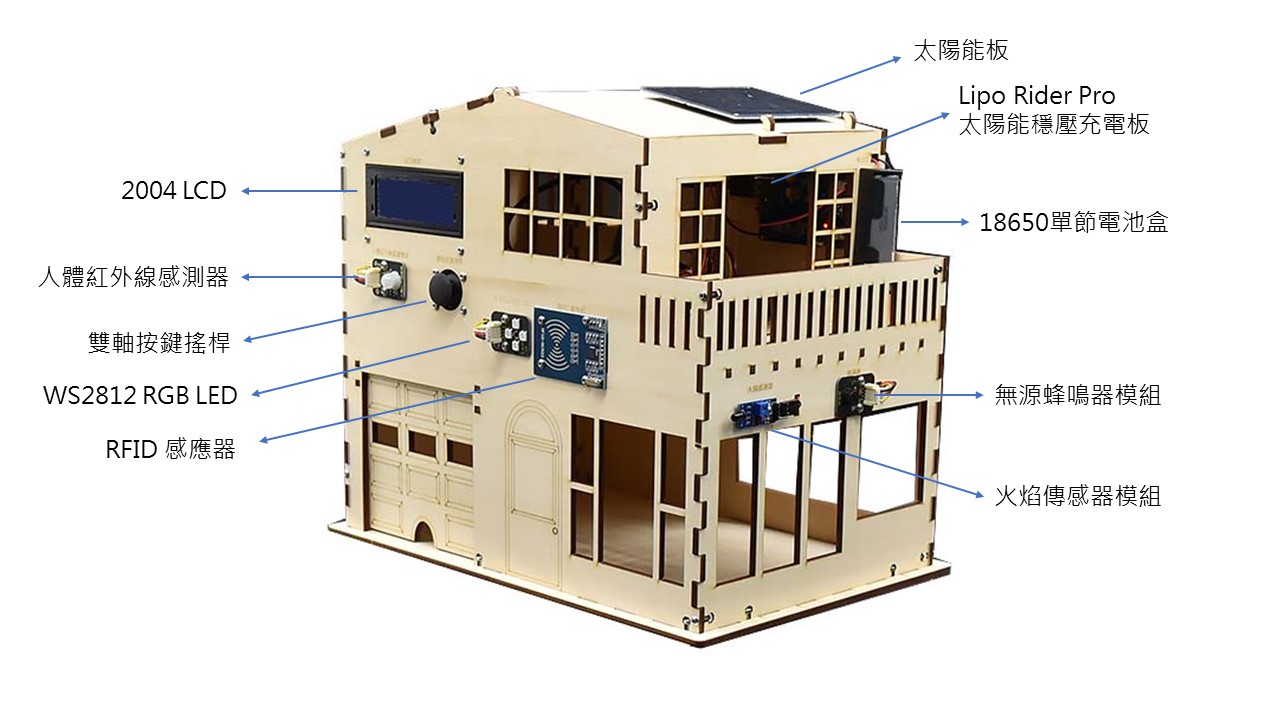
1. 2004 LCD module: a panel 20 characters wide and 4 high that can show 80 characters at a time. We will use the LCD to show data from the various sensors, and the function of each page can be planned in code.
3. Dual-axis joystick: provides analog X and Y values and a digital push switch. We will use these external inputs to interact with the system.
4. WS2812 RGB LED: a programmable RGB LED. We will combine it with the joystick, RFID, and light sensor to create interactive effects.
5. RFID reader: detects cards or devices that support RFID, such as iPASS, EasyCard, and NFC devices (phones).
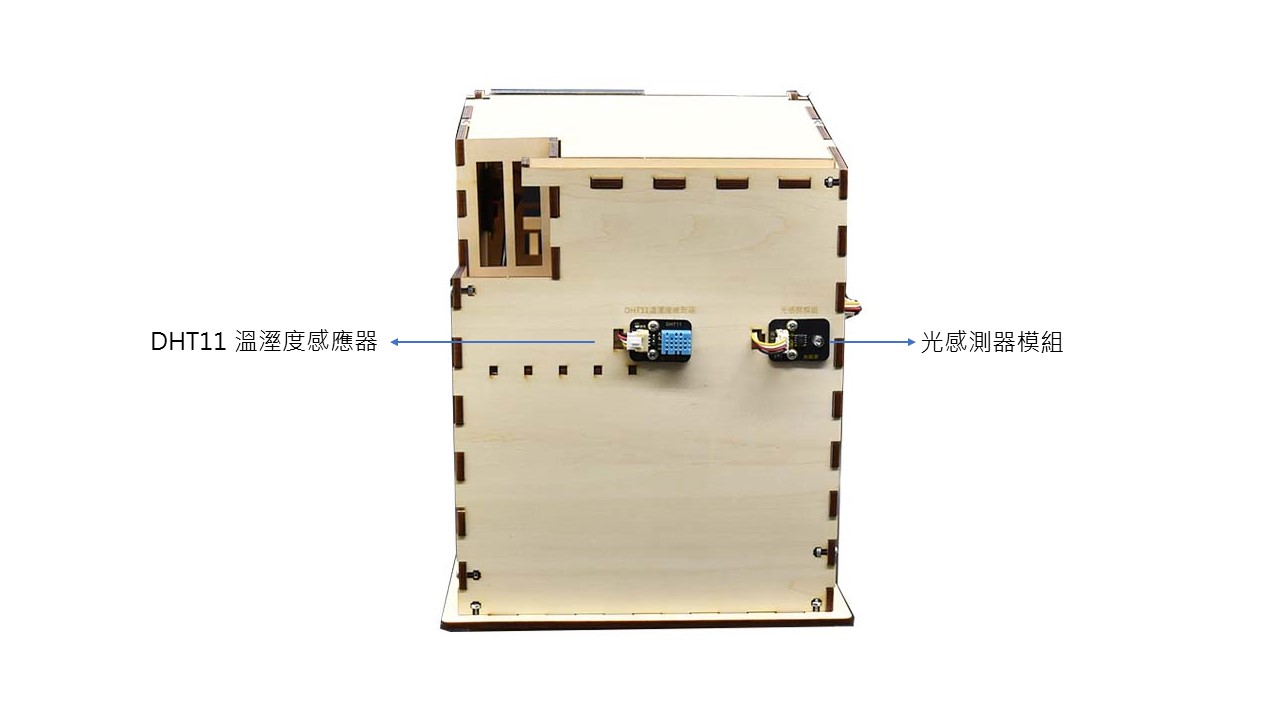
6. DHT11 temperature and humidity sensor: senses ambient temperature and humidity. Its accuracy is not on par with professional sensors, but it is still a useful reference if you only need approximate values.
7. Light sensor module: senses ambient light intensity and outputs it as an analog value. We will use this value to control WS2812 brightness, simulating lighting that adjusts automatically with ambient light.
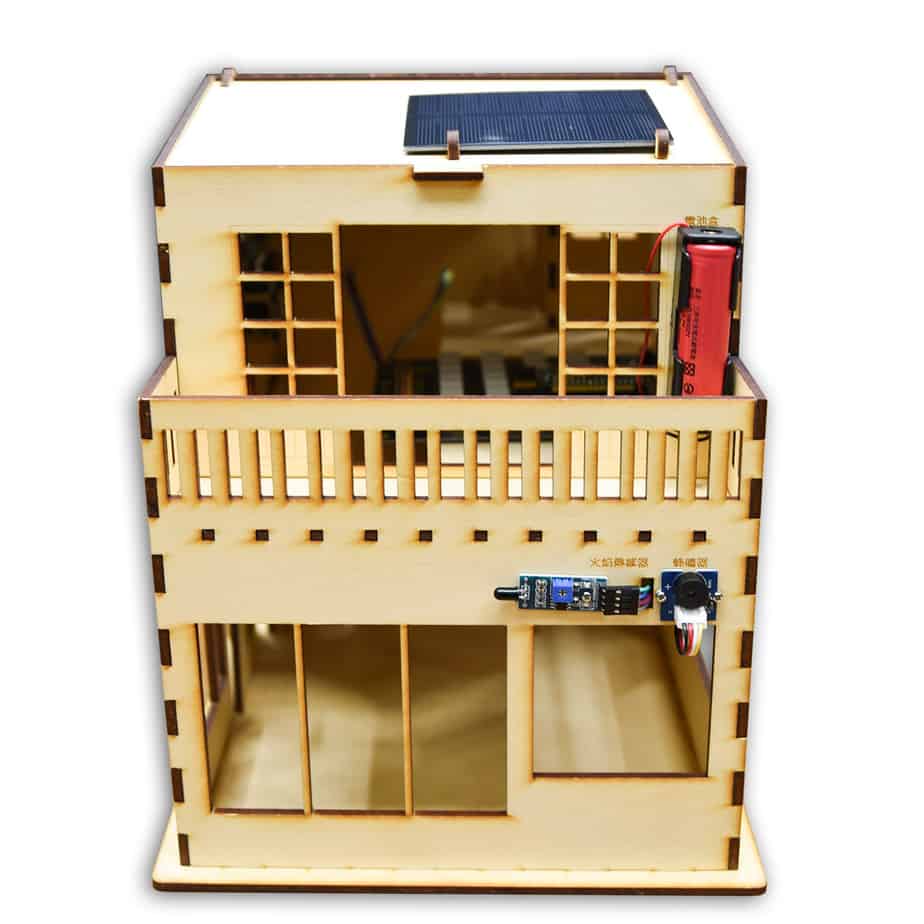
8. Flame sensor: detects flames and outputs a digital signal. We will combine it with the buzzer to simulate a fire alarm.
9. Buzzer: produces various musical pitches under frequency control. We will combine it with the surrounding sensors to create interactive effects.
10. Circus 7697D: a development board for IoT applications. It includes 2.4 GHz/5 GHz Wi-Fi and Bluetooth 4.2 Low Energy for wireless communication, so users can start writing programs right away without an external wireless module.
11. EzDIO expansion board: a three-in-one expansion board that works with micro:bit, LinkIt 7697, and ESP32 controller boards. It provides plenty of Grove sockets, which suits projects that connect multiple sensor devices.
12. Lipo Rider: provides a stable power output and uses a power management IC to charge the battery with power from the solar panel above.
Contact us
Your message goes straight to our team, and we usually reply within one business day.
- 01Questions? Send us a message or add us on LINE.
- 02Quotes and orders, including international shipping
- 03Teacher training and professional development

Scan with your phone to add us on LINE.
Add us on LINE