
IoT Cabin
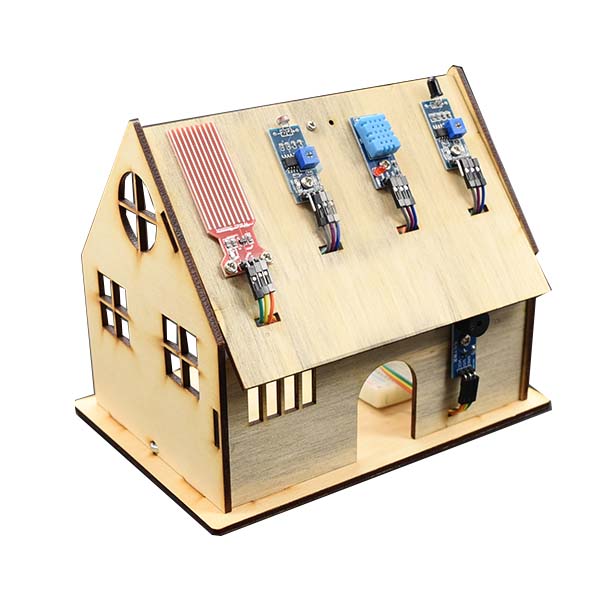
An IoT cabin teaching kit that uses the LinkIt 7697 as its main board. Students learn how to write programs and use sensors, and combine them with web services to explore the Internet of Things.
What this kit teaches
Meet the IoT Cabin and BlocklyDuino
Introduction to the Internet of Things, understanding the smart cabin, LinkIt 7697 hardware specifications, and the BlocklyDuino development environment.
Modules on the cabin and assembling the IoT Cabin, part 1
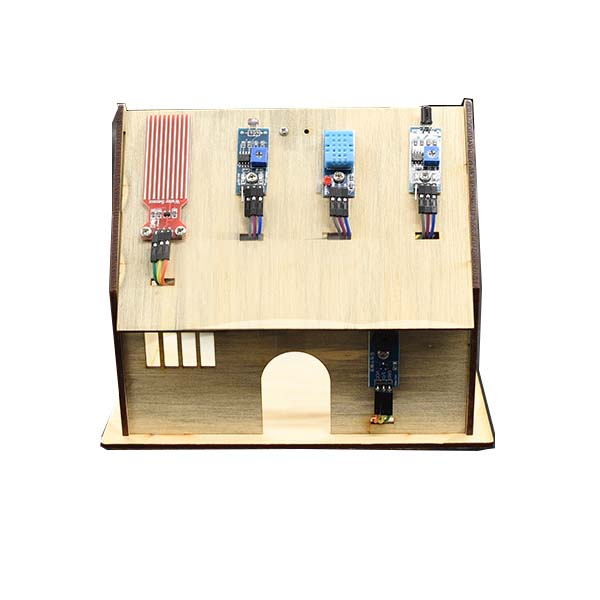
Get to know the sensors on the IoT Cabin: DHT11 temperature and humidity sensor, Arduino® CGGS water level sensor, flame sensor, photoresistor, and RGB LED.
Assembling the IoT Cabin, part 2
Breadboard introduction and use, power expansion, connecting the buzzer, flame sensor, DHT11, and light sensor.
Course outline
01 Getting to know the IoT Cabin
Unit content
- Introduction to the Internet of Things
- Understanding the smart cabin
Matching materials: CIRCUS Pi course outline “LinkIt IoT Cabin,” Unit 1
02 Understanding the LinkIt 7697
Unit content
- LinkIt 7697 hardware specifications
Matching materials: CIRCUS Pi course outline “LinkIt IoT Cabin,” Unit 2
03 Getting familiar with BlocklyDuino
Unit content
- BlocklyDuino development environment
Matching materials: CIRCUS Pi course outline “LinkIt IoT Cabin,” Unit 3
04 Modules on the cabin
Unit content
- Get to know the sensors on the IoT Cabin:
- DHT11 temperature and humidity sensor
- Arduino® CGGS water level sensor
- Flame sensor
- Photoresistor
- RGB LED
- Passive buzzer
Matching materials: CIRCUS Pi course outline “LinkIt IoT Cabin,” Unit 4
05 Signal input and output
Unit content
- Upload LED and button programs to the LinkIt 7697
- Install the USB driver
- Set up a button to control an LED
Matching materials: CIRCUS Pi course outline “LinkIt IoT Cabin,” Unit 5
06 Assembling the IoT Cabin, part 1
Unit content
- Install the modules:
- Temperature and humidity sensor
- Arduino® CGGS water level sensor
- Flame sensor
- Photoresistor
- RGB LED
- Passive buzzer
Matching materials: CIRCUS Pi course outline “LinkIt IoT Cabin,” Unit 6
07 Assembling the IoT Cabin, part 2
Unit content
- Breadboard introduction and use
- Power expansion
- Connect the buzzer
- Flame sensor
- Connect the DHT11
- Light sensor
- Connect the rain sensor
- Connect the RGB LED
Matching materials: CIRCUS Pi course outline “LinkIt IoT Cabin,” Unit 7
08 Using the LinkIt Remote app
Unit content
- Control the IoT Cabin with LinkIt Remote
Matching materials: CIRCUS Pi course outline “LinkIt IoT Cabin,” Unit 8
The course outline follows the official CIRCUS Pi course outline. Please contact us for the number of class periods, which depends on each school’s schedule.
Related tutorial articles
- Build a Smart Home with the LinkIt 7697 IoT Cabin (Part 1)
- Build a Smart Home with the LinkIt 7697 IoT Cabin (Part 2)
Hardware specifications
| Development board | Circus 7697D |
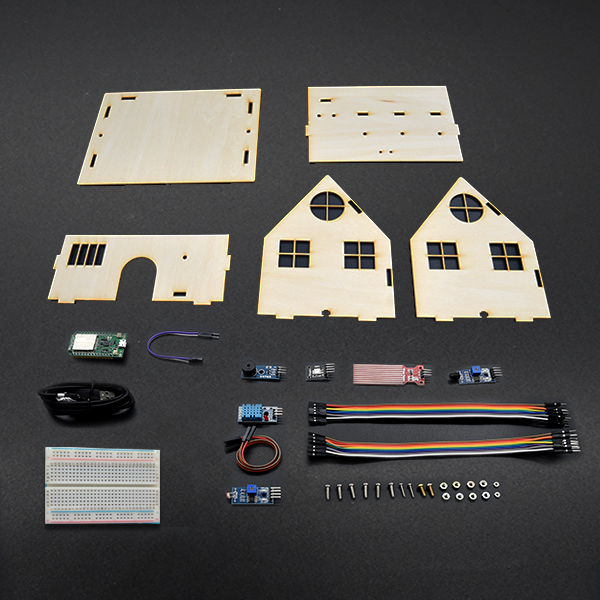
| Components and modules | • 400-point breadboard, 8.5 x 5.5 cm • DHT11 temperature and humidity sensor module • Arduino® CGGS water level sensor • Flame sensor module • Light sensor module • RGB LED module • Passive buzzer module • Micro USB cable, 1 m • 10 colored Dupont jumper wires (male/female), 20 cm • 40 colored Dupont jumper wires (male/male), 10 cm |
Product features
A teaching kit for an IoT cabin that uses the LinkIt 7697 as its main board. It teaches how to write programs and use sensors, and combine them with web services to explore the Internet of Things.
The LinkIt 7697 main board has Bluetooth and Wi-Fi, so you can easily use MediaTek services as needed (LinkIt Remote and MediaTek Cloud Sandbox Lite).
Two programming environments are available: the Arduino IDE and the block-based BlocklyDuino (the latest version is Windows only), suitable for beginner to advanced users.
With the environmental sensors in the kit, you can build an IoT cabin suited for teaching.
Contact us
Your message goes straight to our team, and we usually reply within one business day.
- 01Questions? Send us a message or add us on LINE.
- 02Quotes and orders, including international shipping
- 03Teacher training and professional development
Scan with your phone to add us on LINE.
Add us on LINE